

Payins
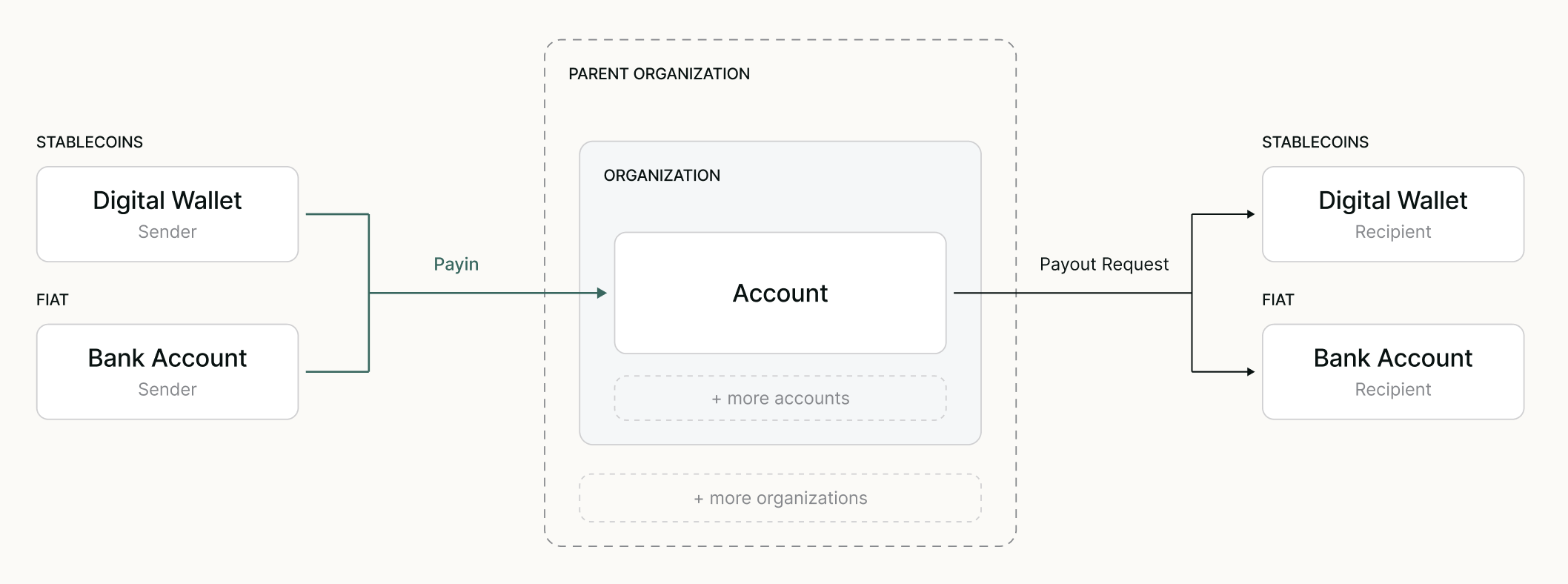
Payins (deposits) represent a single inflow of funds into a Mural Account. You can initiate a Payin in one of two ways:
- Via an external transfer to the provided payin method details.
- By creating a payin intent with the Payins API.
A Payin has a sourceAmount and settlementDetails. The sourceAmount is what the payer sends, in fiat (such as USD over ACH) or a stablecoin (such as USDC on Polygon). The settlementDetails show where that amount settles in the Account, also as fiat or a stablecoin.
How a Payin settles depends on what the payer sends:
- Fiat Payins settle according to the Account's settlement strategy, which either converts the funds to a stablecoin or keeps them in fiat.
- Stablecoin Payins don't use the Account's settlement strategy. See Supported Tokens for the tokens an Account can receive and how to send them.
Settlement strategies
Settlement strategies apply only to fiat Payins.
A settlement strategy defines how Mural handles a fiat Payin when it is received into an Account and settles there. It is set on the Account's USD payin method, and every fiat Payin records the strategy that applied to it.
type | What happens to incoming funds |
|---|---|
autoOnramp | Mural converts the funds to the Account's destination token, such as USDC, and credits the token to the Account's underlying wallet. |
holdInFiat | Mural keeps the funds as a fiat balance on the Account. No conversion takes place, so no conversion fee applies. |
Only USD payins can use holdInFiat. Payins in every other fiat currency, such as COP, MXN, BRL, ARS or EUR, always settle with autoOnramp.
Set the strategy when you create an Account with payinsSettlementStrategies, or change it later with Set settlement strategy for an Account. A change applies to Payins that arrive after it.
Each fiat Payin returns the strategy that applied to it in settlementStrategy, and where the funds landed in settlementDetails.
For example:
- Keep a fiat balance. A business receives customer payments in USD by bank transfer and pays its suppliers in USD. It sets
holdInFiaton its USD payin method so the payments stay in USD, with no conversion. - Settle to stablecoins. A platform pays its users in USDC on Polygon. It uses
autoOnramp, so every incoming fiat payment converts to USDC as it settles.
Payin intents
Not all payin methods support payin intents. Payin methods without payin intent support, such as ACH, wire, SEPA, and blockchain transfers, only receive funds through an external transfer to the Account's payin method details. The table below lists the rails that support them.
A payin intent is a Payin you create through the API before any money moves. You tell Mural the amount, the payment rail, and the Account to credit. Mural returns payment instructions for that exact amount, valid until expiresAt. When the payer follows the instructions, the Payin moves through the normal Payin lifecycle and settles into your Account.
Some payment rails need instructions generated for each payment, such as a PIX code or a single-use key. These rails require a payin intent. Other rails, such as ACH, wire, SEPA, and blockchain transfers, credit your Account through its standing payin method details, so no intent is needed.
payinDetails.type | Rail | Instructions returned | Default validity |
|---|---|---|---|
brl-pix | BRL PIX | brCode | 1 day |
mxn-spei | MXN SPEI | bankAccountNumber (CLABE), bankName | 1 day |
ars-bank-transfer | ARS bank transfer | cvu, bankName | 5 minutes |
cop-bre-b | COP Bre-B | keyValue (single-use), descriptionToPayer | 5 minutes |
cop | COP PSE | depositUrl, redirectUrl | 7 days |
Set expiresInSeconds to change how long the instructions stay valid, within the limits of each rail. For the request fields of each rail, see Create a Payin Intent.
| Status | Meaning |
|---|---|
created | The intent is waiting for the payer's funds. |
pending | Mural received the funds and is settling them. |
completed | The funds settled into the Account. |
canceled | The intent expired, or you canceled it with Cancel a Payin. |
refunded | The funds were returned to the payer. See Refunds. |
You cannot create a payin intent in the sandbox. To test a payin there, use Simulate a Payin. See Simulated Payments.
Updated 21 days ago