
Compliance Reviews
Compliance Reviews are the recommended way to pass through your End User KYB / KYC information. The Compliance Review process is managed by the Compliance API.
Compliance Reviews
A Compliance Review is the unit of work for advancing an Organization's KYC standing on the Mural platform. Before an Organization can transact, it must complete at least one Compliance Review to establish a verified identity Tier.
Mural supports two types of Compliance Reviews. You choose which one to create based on how the underlying Organization was set up:
- Individual Compliance Reviews (
type: "individual") — used when the Organization represents a single person operating in their own capacity. Required attestations cover that individual's identity and residency. - Business Compliance Reviews (
type: "business") — used when the Organization represents a legal entity (LLC, corporation, etc.). Required attestations cover the business itself plus its associated persons — up to four beneficial owners plus one control person (the same individual may hold both relationships).
The accepted review type is based on the type of the Organization. A business Organization will not be able to create an Individual Compliance Review and vice versa.
Attestations
An Attestation is a grouped set of related KYC data submitted as part of a Compliance Review - for example, an individual's personal information (name, date of birth, nationality) or a business's formation documents. Each Compliance Review specifies exactly which attestations are required for the requested Tier via the requiredAttestations field on the review.
requiredAttestations is not necessarily exhaustive at create time. Some attestations are conditionally required based on data you upload - for example:
- Business Organizations that report
transmittingCustomerFunds: trueon thebusinessOperationsattestation will seebusinessFlowOfFundsDocumentadded torequiredAttestationsafter that upload. - Individual Standard reviews where the applicant's residential address is in the EEA or the UK will see
individualProofOfAddressadded torequiredAttestationsafter theindividualResidentialAddressupload. - Individual Standard reviews where
individualFinancialInfo.monthlyUsdVolumeis anything other than the lowest band will seeindividualSourceOfFundsadded.
Re-read the review with GET /compliance/{organizationId}/reviews/{complianceReviewId} after each upload to see the current effective requiredAttestations
How it works
Compliance reviews follow a simple four-step flow, all of which can be done via our Compliance API:
- Create a Compliance Review —
POST /compliance/{organizationId}/reviews. The request body requires both a reviewtype(individualorbusiness) and atier. Tier values are uppercase:LIGHT,STANDARD,US_STANDARD,FULL. Individual tiers (LIGHT,STANDARD) must be paired withtype: individual; business tiers (US_STANDARD,FULL) must be paired withtype: business. The review begins indraftstatus and the response'srequiredAttestationsfield tells you the baseline set of attestations to upload. Each(organizationId, tier, type)pair is unique — repeating the call returns an error; use list/get to fetch the existing review instead. The endpoint also accepts an optionalidempotency-keyrequest header (value must be a UUID) for safe retries. - Upload attestations —
PUT /compliance/{organizationId}/reviews/{complianceReviewId}/attestations. Submit the required KYC data to the review. Attestations are saved immediately; re-uploading an attestation type replaces the previous instance, so you can apply corrections before submitting. Some uploads will expandrequiredAttestations(see the Attestations section above), so re-read the review after each call. - Submit for review —
POST /compliance/{organizationId}/reviews/{complianceReviewId}/submit. Mural validates the attestations and begins a compliance evaluation. Submit requires that the Organization has a signed Mural agreement on file. If submission fails — for example because a required attestation is missing, the review is no longer indraft, or the Organization is not enrolled in the requested tier — the API returns a 4xx response and the review stays indraftso you can correct and retry. Missing-attestation errors enumerate exactly which attestation types are still required. - Check status for your review — poll
GET /compliance/{organizationId}/reviews/{complianceReviewId}(orGET /compliance/{organizationId}/reviewsto fetch all reviews for the Organization), or subscribe to the verification status changed webhook event. The same webhook event fires for both individual and business compliance reviews; the delivered payload'stypefield isbusiness_verification_status_changed
Review statuses
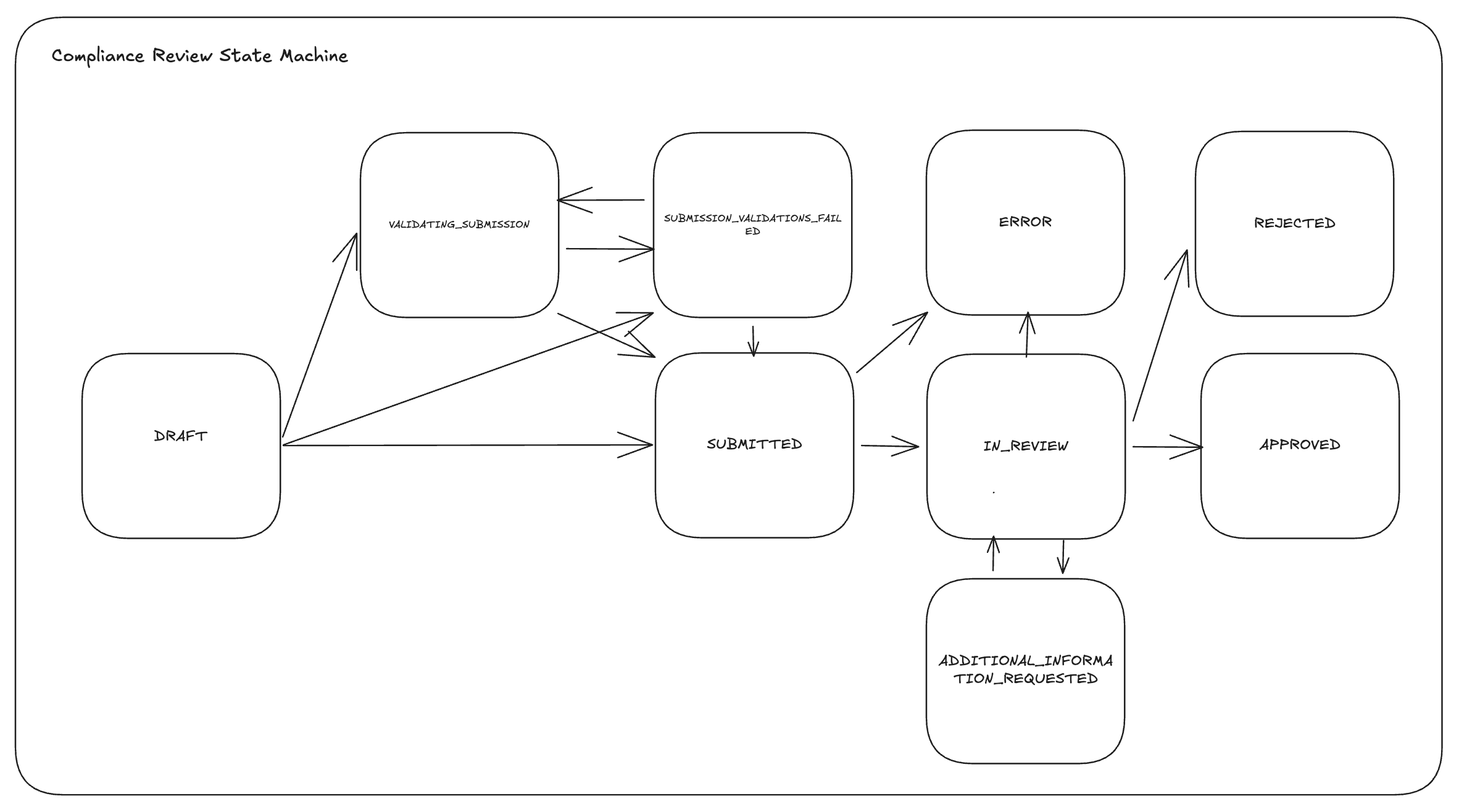
A review's status is a discriminated union — the status.type field tells you which state it is in. The seven values are:
status.type | Meaning | Terminal? |
|---|---|---|
draft | Review created; awaiting attestation uploads. | No |
submitted | Submit accepted; attestations validated; queued for evaluation. | No |
validatingSubmission | Validations currently running against the data submitted through your compliance review. | No |
submissionValidationsFailed | One or many validations against data submitted through your compliance review have failed - these failures can be blocking or non-blocking (warning) | No |
inReview | Compliance is actively evaluating the review. | No |
additionalInformationRequested | Mural needs more input — see additionalInformationDetails on each attestation. | No |
approved | The requested KYC tier has been granted to the Organization. | Yes |
rejected | The review was declined — see rejectionDescription. | Yes |
error | An error occurred during processing — see errorDescription. | Yes (reach out to support team) |
Upgrading between tiers
Tiers are ordered within each review type, and higher tiers supersede lower ones once approved:
- Individuals:
STANDARDsupersedesLIGHT. - Businesses:
FULLsupersedesUS_STANDARD.
To upgrade, create a new Compliance Review at the higher tier and follow the same four-step flow.
Tiers
Individual Tiers
Light
Lightweight KYC requiring an individual's name, date of birth, phone number, and residential address (nationality is optional). Submitted as the individualPersonalInfoLight attestation.
Light enables a subset of Mural's LATAM rails with transaction limits configured per parent organization. Light tier is gated per parent organization: contact Mural to enable Light for your parent organization and to configure transaction thresholds before attempting to create a Light review.
Standard
Full individual KYC: personal info, contact info, residential address, identity document, financial info, and tax info. Proof-of-address and source-of-funds are added conditionally based on residency and declared monthly volume (see the Attestations section above).
Standard unlocks all supported individual payment rails with no transaction threshold.
Business Tiers
US Standard (tier: US_STANDARD)
tier: US_STANDARD)USD-only KYB with a reduced document set — no beneficial-owner ownership documents and no proof-of-address documents required at either the business or associated-person level. Enables USD payment rails for businesses that do not need international offramp support.
Full (tier: FULL)
tier: FULL)Full KYB with the complete document set, including beneficial-owner ownership documents and proof-of-address (both at the business level and per associated person). Unlocks Mural's international offramp providers in addition to everything US_STANDARD enables.
A business approved on US_STANDARD can upgrade to FULL by creating a new Compliance Review at the FULL tier.
Updated 4 months ago