
Business Compliance Reviews
Mural supports two KYB tiers for business organizations: US_STANDARD and FULL. Both tiers follow the same lifecycle - create the compliance review, upload supporting documents, declare the business's associated persons (UBOs and control person), upload per-associated-person attestations, upload review-level attestations, then submit the review for evaluation. The tiers differ in which document attestations are required and what payout rails the approved tier unlocks.
| Tier | Use case | Attestations |
|---|---|---|
US_STANDARD | USD-only payouts with a streamlined KYB. | Omits businessUboOwnershipDocuments and businessProofOfAddressDocuments at the review level, and omits associatedPersonProofOfAddress for every associated person. |
FULL | International payouts with full KYB verification. | Adds businessUboOwnershipDocuments and businessProofOfAddressDocuments at the review level, and adds associatedPersonProofOfAddress for every associated person. |
Both tiers share the same 9 base review-level attestations: businessIdentification, businessTaxInfo, businessAddress, businessContactInfo, businessDetails, businessOperations, businessFinancialInfo, businessFormationDocuments, businessAssociatedPersons. One additional review-level attestation, businessFlowOfFundsDocument, is conditionally required at submit time when businessOperations.transmittingCustomerFunds is set to true (applies to both tiers).
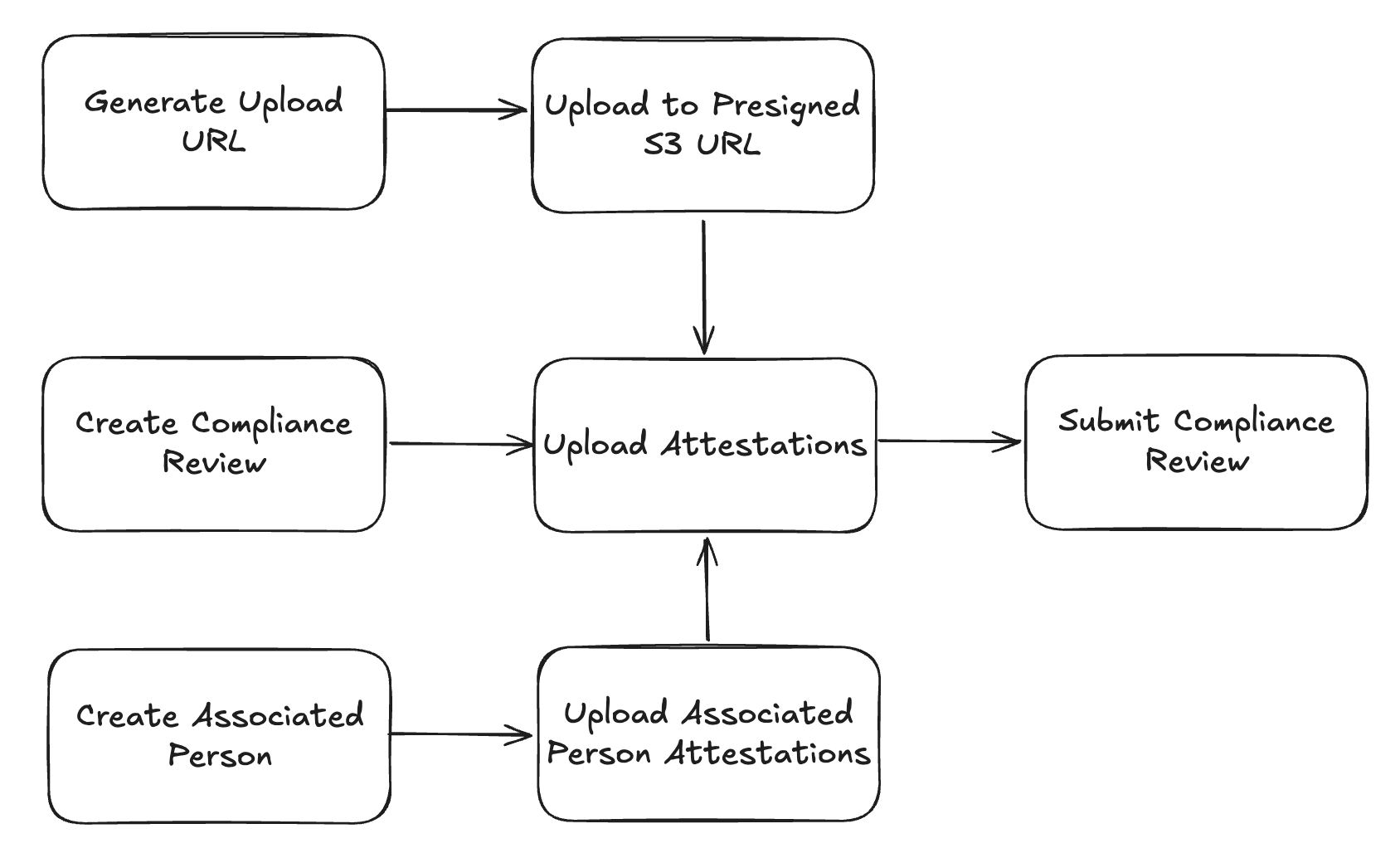
Step 1: Create a compliance review
Create a compliance review using the Create Compliance Review endpoint. Pass type: "business" and the tier you want. The response's requiredAttestations array tells you which attestations you must upload before submitting.
Example request — US_STANDARD
US_STANDARDcurl --request POST \
--url "https://api.muralpay.com/api/compliance/$ORGANIZATION_ID/reviews" \
--header 'accept: application/json' \
--header "authorization: Bearer $MURAL_API_KEY" \
--header 'content-type: application/json' \
--header 'idempotency-key: 7f5a6e4b-2c1d-4a3f-9b8e-1d2c3e4f5a6b' \
--data '{
"type": "business",
"tier": "US_STANDARD"
}'Example request — FULL
FULLcurl --request POST \
--url "https://api.muralpay.com/api/compliance/$ORGANIZATION_ID/reviews" \
--header 'accept: application/json' \
--header "authorization: Bearer $MURAL_API_KEY" \
--header 'content-type: application/json' \
--header 'idempotency-key: 7f5a6e4b-2c1d-4a3f-9b8e-1d2c3e4f5a6b' \
--data '{
"type": "business",
"tier": "FULL"
}'Step 2: Upload supporting documents
Several review-level and associated-person attestations reference files that must be uploaded. For each document, use the Generate Upload URL endpoint to obtain a presigned S3 POST URL, upload the file , then keep the returned documentId to reference in the attestations later. See our Document Uploads Guide for a guide on using our documents API.
Document-bearing attestations on a business review:
businessFormationDocuments— required for both tiers.businessUboOwnershipDocuments— required only forFULL.businessProofOfAddressDocuments— required only forFULL.businessFlowOfFundsDocument— conditional (see Step 6).associatedPersonProofOfAddress— required per associated person onFULLonly
Step 3: Create associated persons
Both tiers require you to declare the business's control person and beneficial owners (UBOs). Create each one using the Create Associated Person endpoint. Each associated person is scoped to the organization and can be referenced from the review's businessAssociatedPersons attestation in Step 5.
Constraints:
- At most one
CONTROL_PERSONper organization. - Up to four
BENEFICIAL_OWNERs per organization. - A single person can hold both roles by passing
relationships: ["BENEFICIAL_OWNER", "CONTROL_PERSON"].
Example request
curl --request POST \
     --url "https://api.muralpay.com/api/compliance/$ORGANIZATION_ID/associated-persons" \
     --header 'accept: application/json' \
     --header "authorization: Bearer $MURAL_API_KEY" \
     --header 'content-type: application/json' \
     --data '{
       "relationships": ["BENEFICIAL_OWNER", "CONTROL_PERSON"]
     }'
Step 4: Upload associated-person attestations
For each associated person, upload their associated person attestations using the Upload Associated Person Attestations endpoint.
Example request
curl --request PUT \
     --url "https://api.muralpay.com/api/compliance/$ORGANIZATION_ID/associated-persons/$COMPLIANCE_REVIEW_ID/attestations" \
     --header 'accept: application/json' \
     --header "authorization: Bearer $MURAL_API_KEY" \
     --header 'content-type: application/json' \
     --data '{
       "attestations": [
         {
           "type": "associatedPersonPersonalInfo",
           "name": { "firstName": "Jane", "lastName": "Doe" },
           "birthDate": "1985-06-15",
           "nationality": "US",
           "isPoliticallyExposed": false,
           "jobTitle": "Chief Executive Officer",
           "ownershipPercentage": 50
         }
       ]
     }'
Step 5: Upload review-level attestations
Upload the business attestations to the review using the Upload Attestations endpoint.
Example request — full
curl --request PUT \
     --url "https://api.muralpay.com/api/compliance/$ORGANIZATION_ID/reviews/$COMPLIANCE_REVIEW_ID/attestations" \
     --header 'accept: application/json' \
     --header "authorization: Bearer $MURAL_API_KEY" \
     --header 'content-type: application/json' \
     --data '{
       "attestations": [
         {
           "type": "businessIdentification",
           "businessName": "Acme Corp",
           "registrationNumber": "REG123456",
           "dbaName": "Acme"
         },
         {
           "type": "businessAssociatedPersons",
           "associatedPersonIds": [
             "550e8400-e29b-41d4-a716-446655440001",
             "550e8400-e29b-41d4-a716-446655440002"
           ]
         }
       ]
     }'
Step 6: Submit the review
Once every required attestation has been uploaded - both review-level and on every associated person - submit the review using the Submit Compliance Review endpoint.
Example request
curl --request POST \
     --url 'https://api.muralpay.com/api/compliance/$ORGANIZATION_ID/reviews/a1b2c3d4-e5f6-7890-abcd-ef1234567890/submit' \
     --header 'accept: application/json' \
     --header "authorization: Bearer $MURAL_API_KEY"
Step 7: Await the compliance decision
Once submitted, status changes flow through the business_verification_status_changed webhook event (category BUSINESS_VERIFICATION_STATUS). The payload carries organizationId, verificationId, previousStatus, currentStatus, and updatedAt. The same event category and event type cover both individual and business reviews — a single webhook subscription handles both.
You may also poll for status using the Get Compliance Review endpoint.
Example request
curl --request GET \
     --url https://api.muralpay.com/api/compliance/$ORGANIZATION_ID/reviews/$COMPLIANCE_REVIEW_ID \
     --header 'accept: application/json' \
     --header "authorization: Bearer $MURAL_API_KEY"
Updated 5 months ago