
Individual Compliance Reviews
Mural supports two KYC tiers for individual organizations: LIGHT and STANDARD. Both tiers follow the same four-step lifecycle - create a compliance review, upload the required attestations, submit the review for evaluation, then await the compliance decision. The tiers differ only in which attestations are required and what transacting capabilities the approved tier unlocks.
| Tier | Use case | Attestation set |
|---|---|---|
LIGHT | Onboard near-instantly with a minimal personal-info profile, up to a transacting threshold | Light Tier KYC is not enabled by default — contact the Mural team to opt in. 1 attestation: name, date of birth, phone number, residential address, and optional nationality. |
STANDARD | Full individual KYC, no transacting cap. | 6 unconditional attestations + up to 2 conditional (proof of address for EEA/UK residents, source of funds when expected monthly USD volume is $5,000+). |
Case sensitivity. The discriminator field
typeis lowercase (individual). The tier fieldtieris UPPERCASE (LIGHT/STANDARD). Any other casing is rejected with a 400.
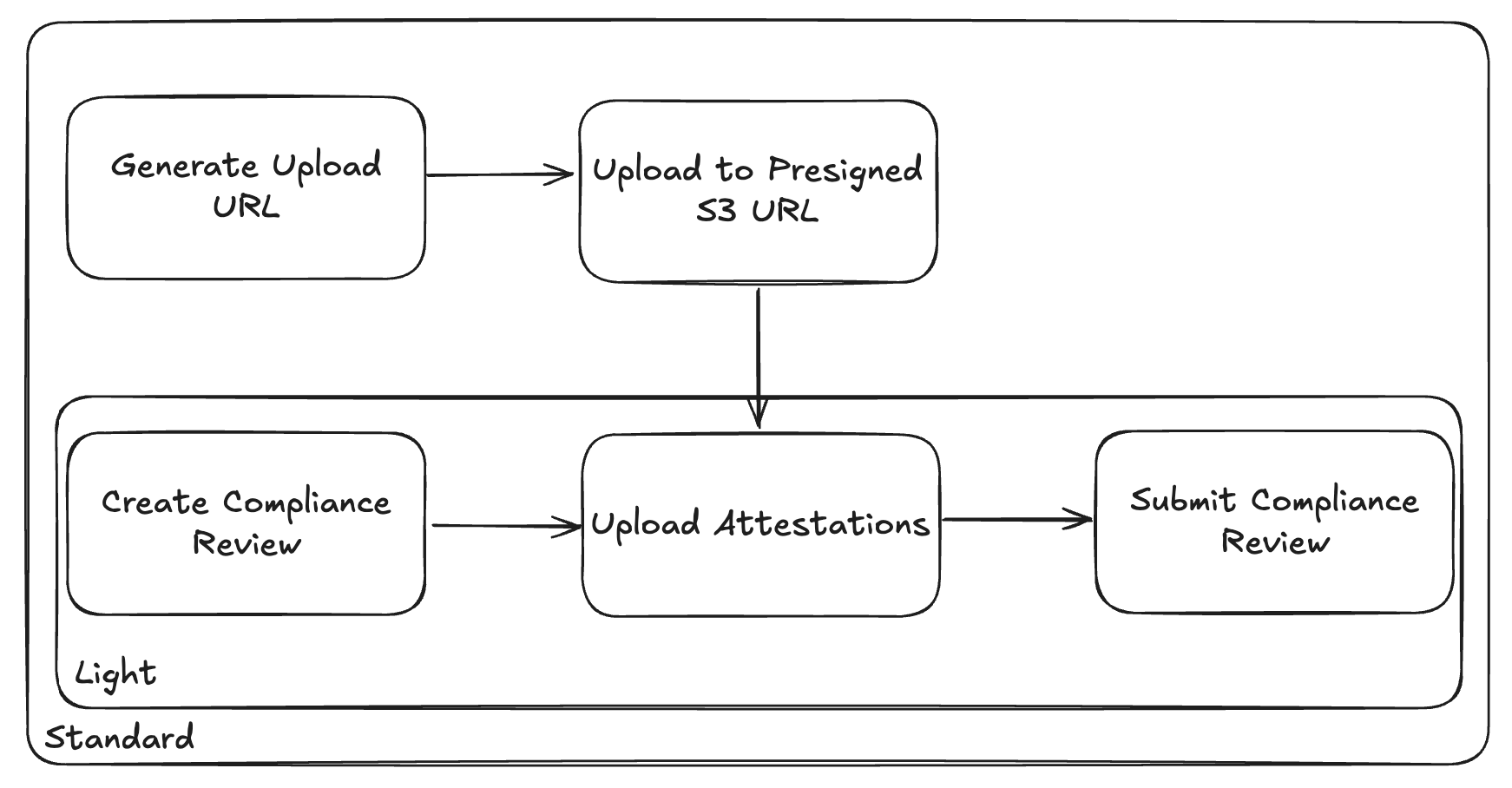
Step 1: Create a compliance review
Create a compliance review for the light tier using the Create Compliance Review endpoint. The review is created in draft status, returning the list of attestations required before you can submit.
The request body has two required fields:
type:"individual"tier:"LIGHT"or"STANDARD"
Example Light Tier request
curl --request POST \
     --url "https://api.muralpay.com/api/compliance/${ORGANIZATION_ID}/reviews" \
     --header "Accept: application/json" \
     --header "Authorization: Bearer ${MURAL_API_KEY}" \
     --header "Content-Type: application/json" \
     --header "Idempotency-Key: 0c1c0f50-7a89-4e3a-9b1a-1d4ce4d6f001" \
     --data '{
       "type": "individual",
       "tier": "LIGHT"
     }'
Example Standard Tier request
curl --request POST \
     --url "https://api.muralpay.com/api/compliance/${ORGANIZATION_ID}/reviews" \
     --header "Accept: application/json" \
     --header "Authorization: Bearer ${MURAL_API_KEY}" \
     --header "Content-Type: application/json" \
     --header "Idempotency-Key: 0c1c0f50-7a89-4e3a-9b1a-1d4ce4d6f002" \
     --data '{
       "type": "individual",
       "tier": "STANDARD"
     }'
Notes on the response:
requiredAttestationsis the baseline required set for the tier at creation time. Conditional attestations (proof of address, source of funds) are added later as their preconditions are met — see Step 2 below
Step 2: Upload attestations
Upload the required KYC data to the review using the Upload Attestations endpoint. You can re-upload an attestation of the same type to correct a value before submitting.
Light tier attestations
Light tier requires a single attestation:
| Attestation type | Contents |
|---|---|
individualPersonalInfoLight | Name, date of birth, optional nationality, phone number, residential address. |
Example request
curl --request PUT \
     --url "https://api.muralpay.com/api/compliance/${ORGANIZATION_ID}/reviews/${COMPLIANCE_REVIEW_ID}/attestations" \
     --header "Accept: application/json" \
     --header "Authorization: Bearer ${MURAL_API_KEY}" \
     --header "Content-Type: application/json" \
     --data '{
       "attestations": [
         {
           "type": "individualPersonalInfoLight",
           "name": {
             "firstName": "Jane",
             "lastName": "Doe"
           },
           "birthDate": "1990-01-15",
           "nationality": "US",
           "phoneNumber": "+14155551234",
           "residentialAddress": {
             "address1": "123 Main St",
             "city": "Austin",
             "country": "US",
             "subDivision": "TX",
             "postalCode": "78701"
           }
         }
       ]
     }'
Standard tier attestations
Standard tier requires six unconditional attestations, plus up to two conditional attestations whose requirement depends on values you upload:
| Attestation type | Required when… | Required fields |
|---|---|---|
individualPersonalInfo | Always. | name, birthDate, nationality, isPoliticallyExposed. |
individualContactInfo | Always. | email, phoneNumber. |
individualResidentialAddress | Always. | address (a PhysicalAddressVerification object). |
individualIdentityDocument | Always. | governmentId (a discriminated union — see below). |
individualFinancialInfo | Always. | sourceOfFunds, employmentStatus, primaryAccountPurpose, monthlyUsdVolume, isTransactingOnBehalfOfOthers, transactionCurrencies (1–11 ISO 4217 codes from a fixed list). employer is required when employmentStatus = "EMPLOYED". latestOccupation is optional; latestOccupationDescription is required when latestOccupation = "OTHER". |
individualTaxInfo | Always. | taxIdentificationNumber, taxIdentificationNumberType (see "Tax ID validation" below). |
individualProofOfAddress | The residential address country is in the EEA or the UK (see country list). | proofOfAddressDocuments: an array of 1–10 { documentType, documentId } objects. |
individualSourceOfFunds | individualFinancialInfo.monthlyUsdVolume ≠ RANGE_0_4999 (i.e. ≥ $5,000/mo). | sourceOfFundsDocuments: an array of 1–10 { documentType, documentId } objects. |
The requiredAttestations field on the review you created in Step 1 already reflects these conditional rules. As attestations are attached to the review, additional attestations may be added to the requiredAttestations field on the compliance review. Always treat the API as source of truth over the table above.
Uploading documents
Attestations that reference documents (individualIdentityDocument, individualProofOfAddress, individualSourceOfFunds) require you to first upload the file and reference its returned documentId. See our Document Uploads Guide for a guide on using our documents API.
Example: Standard tier individualPersonalInfo + individualContactInfo (multiple attestations in one request
individualPersonalInfo + individualContactInfo (multiple attestations in one requestcurl --request PUT \
--url "https://api.muralpay.com/api/compliance/${ORGANIZATION_ID}/reviews/${COMPLIANCE_REVIEW_ID}/attestations" \
--header "Accept: application/json" \
--header "Authorization: Bearer ${MURAL_API_KEY}" \
--header "Content-Type: application/json" \
--data '{
"attestations": [
{
"type": "individualPersonalInfo",
"name": { "firstName": "Jane", "lastName": "Doe" },
"birthDate": "1990-01-15",
"nationality": "US",
"isPoliticallyExposed": false
},
{
"type": "individualContactInfo",
"email": "[email protected]",
"phoneNumber": "+14155551234"
}
]
}'Step 3: Submit the review
Once all required attestations are uploaded, submit the review for compliance evaluation using the Submit Compliance Review endpoint.
Submit re-evaluates requiredAttestations (including any conditional attestations promoted by the data you uploaded) and atomically transitions the review from draft → submitted.
Example request
  curl --request POST \
       --url https://api.muralpay.com/api/compliance/${ORGANIZATION_ID}/reviews/${COMPLIANCE_REVIEW_ID}/submit \
       --header 'accept: application/json' \
       --header "authorization: Bearer ${MURAL_API_KEY}"
Step 4: Await the compliance decision
Once submitted, status changes for the compliance review are delivered through verification webhook events. The event arrives in the BUSINESS_VERIFICATION_STATUS category (event type business_verification.business_verification_status_changed); the same category covers both individual KYC and business KYB reviews.
The review's status field cycles through these variants:
status.type | Notes |
|---|---|
draft | Created. Awaiting attestation uploads. |
submitted | Submit endpoint succeeded; verification queued. Carries submittedAt. |
validatingSubmission | Validations currently running against the data submitted through your compliance review. |
submissionValidationsFailed | One or many validations against data submitted through your compliance review have failed - these failures can be blocking or non-blocking (warning) |
inReview | Verification provider is actively reviewing. Carries submittedAt. |
additionalInformationRequested | Mural compliance has requested more information from the applicant. |
approved | Tier approved. Carries submittedAt and approvedAt. |
rejected | Tier denied. Carries submittedAt, rejectedAt, rejectionDescription. |
error | Verification provider returned an unrecoverable error. Carries submittedAt, errorDescription. The organization may need to create a new review. |
You can also poll the review status at any time using the Get Compliance Review endpoint .
Example request
curl --request GET \
       --url https://api.muralpay.com/api/compliance/${ORGANIZATION_ID}/reviews/${COMPLIANCE_REVIEW_ID} \
       --header 'accept: application/json' \
       --header "authorization: Bearer ${MURAL_API_KEY}"
Updated 5 months ago